
RESOURCE HEAT MAPS
Understand where the service has room—and where it is under pressure.
Use resource heat maps to look across staff and room availability over a period, rather than relying on a single day’s diary.
Look ahead before adding a recurring commitment.
A series needs a workable pattern, not just one available slot. Heat maps help teams review availability across a period and identify where future contact may fit. This makes recurring pressure and useful gaps easier to discuss before more work is committed.
At a glance
- Date-range views of resource availability.
- Filters for locations and resource groups.
- Visibility of recurring pressure and useful gaps.
- A planning view alongside the operational diary.
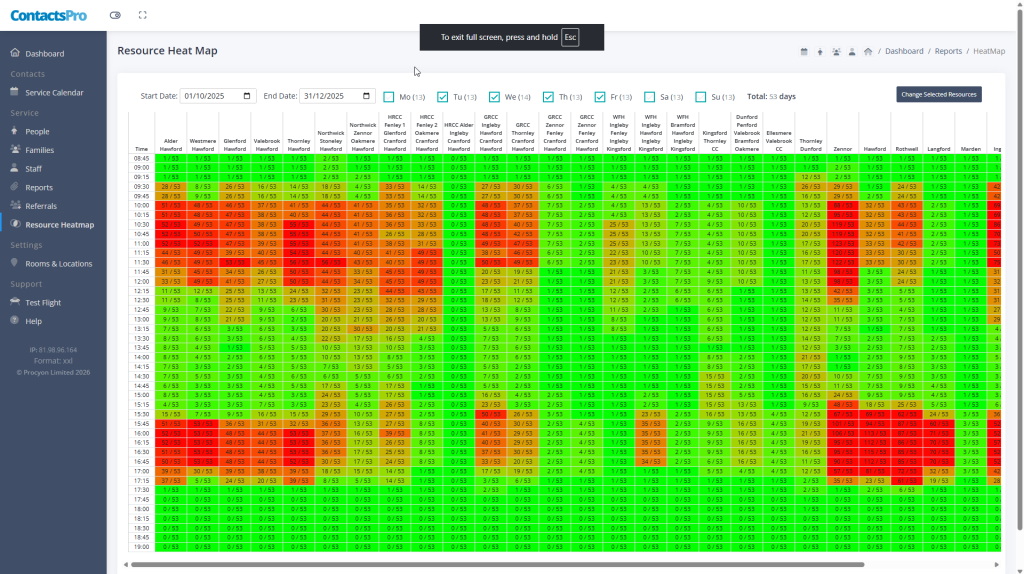
Explore the resources relevant to the decision.
Filter by date range, location or resource group to focus on the part of the service you are planning. The visual pattern helps managers spot concentration and investigate it with the team. It complements the detailed calendar rather than replacing it.
Use evidence in resource discussions.
Bring past utilisation and future availability into conversations about working patterns, room use and demand. The same view can help explain why a particular slot is difficult to place, or identify where existing capacity could be used more effectively.
YOUR QUESTIONS
Frequently asked questions
Is a heat map an automatic staffing recommendation?
No. It is a view of resource information that helps your team investigate and plan. Decisions about appropriate staffing and arrangements remain with the service.
Who benefits from these views?
Administrators can use them when placing work; service managers can use them to discuss capacity, utilisation and future demand.
EXPLORE CONTACTSPRO
TIME, COST & TEAM WELLBEING
Use the capacity you have before paying for more.
A full-looking diary can hide gaps as well as pressure points. Resource heat maps help managers examine staff and room availability so decisions about additional provision start with a clearer view of existing resources.
- Identify useful gaps and recurring bottlenecks.
- Review allocation pressure before overloading staff or venues.
- Use evidence to discuss whether changes to arrangements could make better use of available capacity.
See how ContactsPro could work for your service.
Tell us how you arrange family time. We’ll walk through the workflows that matter to your team.