
REFERRALS & PROGRESS
See what is coming in—and what needs to happen next.
Bring referral information, status and follow-up work into a shared view, connecting the start of the process with the service that follows.

A clearer handover into your service
Keep referral information and supporting documents together as external professionals refer families into your service. Make the next steps and outstanding information easier to follow.
Give incoming work a visible place.
Referrals arrive with information to review and actions to complete. A dedicated dashboard helps administrators see volume, progress and work awaiting attention. Open the referral to review its detail rather than maintaining a separate list of what is outstanding.
At a glance
- Referral dashboards and status visibility.
- Review and follow-up activity.
- Connected information gathering through forms.
- Family and people context alongside the work.
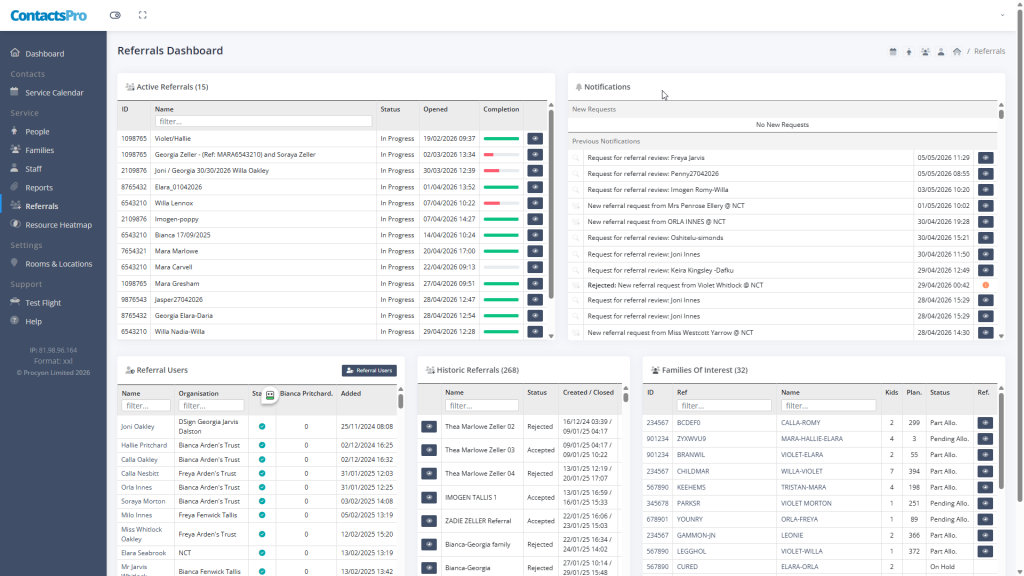
Keep the conversation with the referral.
Requests for information, review activity and changes are part of the referral story. Connected forms and referral workflows help teams gather information and follow its progress, with internal work kept distinct from communication intended for the referrer.
Connect referral information to service planning.
Once arrangements are being developed, staff need the family and people context behind the request. Keeping referral work within the same operational system supports continuity from the incoming request to the planned service.
YOUR QUESTIONS
Frequently asked questions
Can forms be tailored to the information our service needs?
ContactsPro Forms provides reusable questions and configurable form structures. Explore the forms page or ask us to demonstrate your referral workflow.
Does the system decide whether a referral is suitable?
No. Referral decisions remain with your service. ContactsPro helps organise the information, progress and actions around that decision.
EXPLORE CONTACTSPRO
TIME, COST & TEAM WELLBEING
Reduce chasing and avoidable rework.
A visible referral workflow helps colleagues understand what has arrived, what needs attention and what has already been done. That shared view supports better communication and reduces time spent checking progress across inboxes.
- Make outstanding work visible to the team.
- Reduce duplicate follow-up and repeated information requests.
- Give managers a clearer picture of incoming demand before allocating resources.
Make your referral process visible.
Use configurable workflows and milestones to reflect the checks and follow-up steps your service requires. Keep progress with the referral so colleagues can see what still needs attention.
Bring contributors and checks into one referral process.
- Capture requests through a dedicated referral portal, including requests initiated by external contributors.
- Allow authorised colleagues and external contributors to collaborate on the same referral, with access controlled for each case.
- Save progress and return to the form; configure required information and completion checks to reduce incomplete submissions.
- Follow answer history, completion activity and referral status notifications.
- Convert completed referrals into active case information, reducing repeat entry.
- Review referral status, duration and outcomes through dashboards and reporting.
See how ContactsPro could work for your service.
Tell us how you arrange family time. We’ll walk through the workflows that matter to your team.